Settings API Interest
Why the settings architecture matters and how it removes duplicate logic.
What It Does
@kit/settings centralizes settings schema, storage mapping, form rendering, and retrieval for both server and client usage.
Manual settings pages are typically painful, error-prone, and hard to maintain. The package removes most of that duplication.
When To Use
- You need user/organization settings pages.
- You need typed settings reads in server routes/actions.
- You need typed settings reads in client components/hooks.
Prerequisites
- A schema defined with
parseSchemaSettingConfig. - App server filters enqueueing schema into
server_get_settings_schema.
Architecture Snapshot
To solve this, we chose an architecture close to a MVC (Model-View-Controller) architecture.
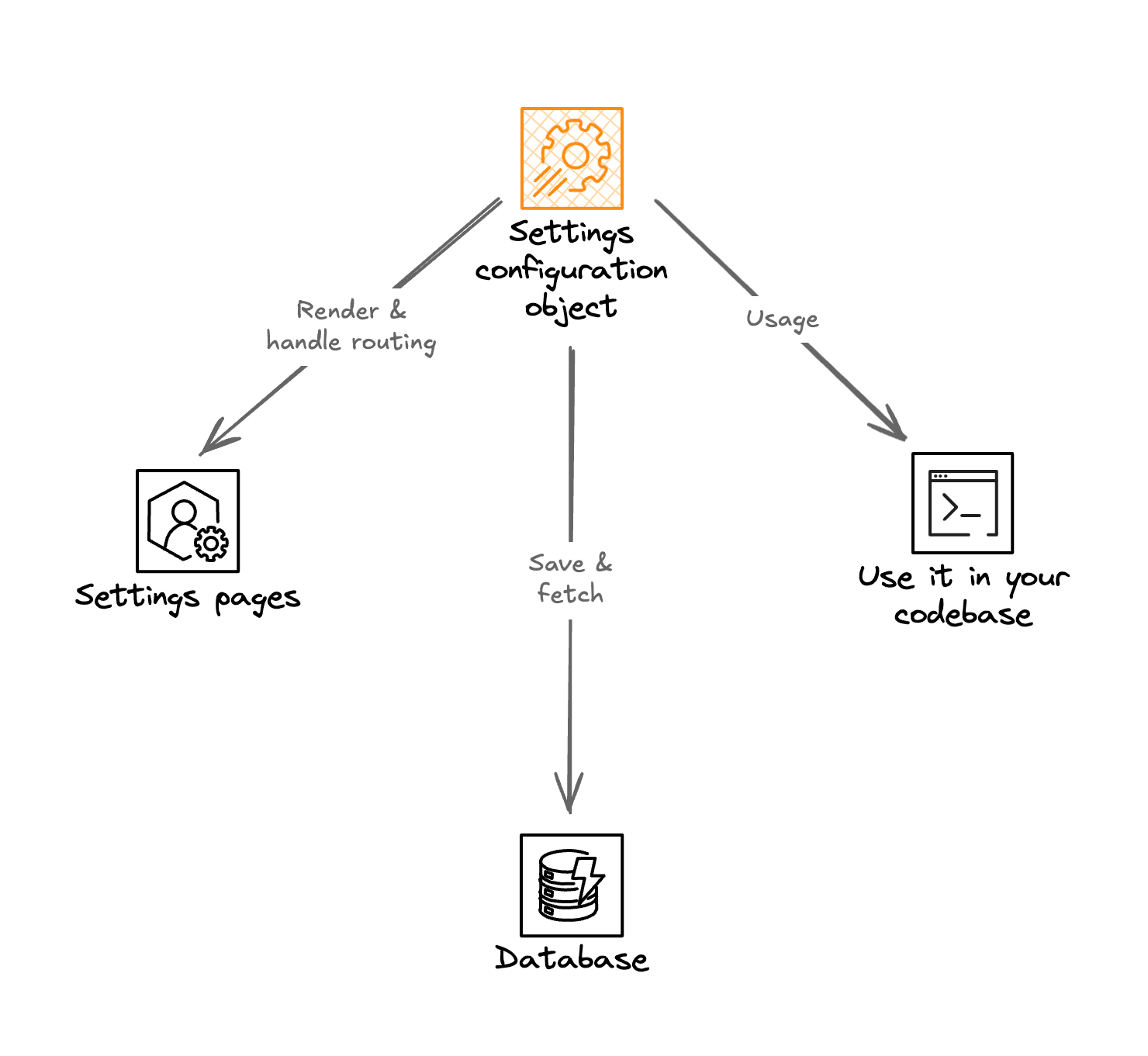
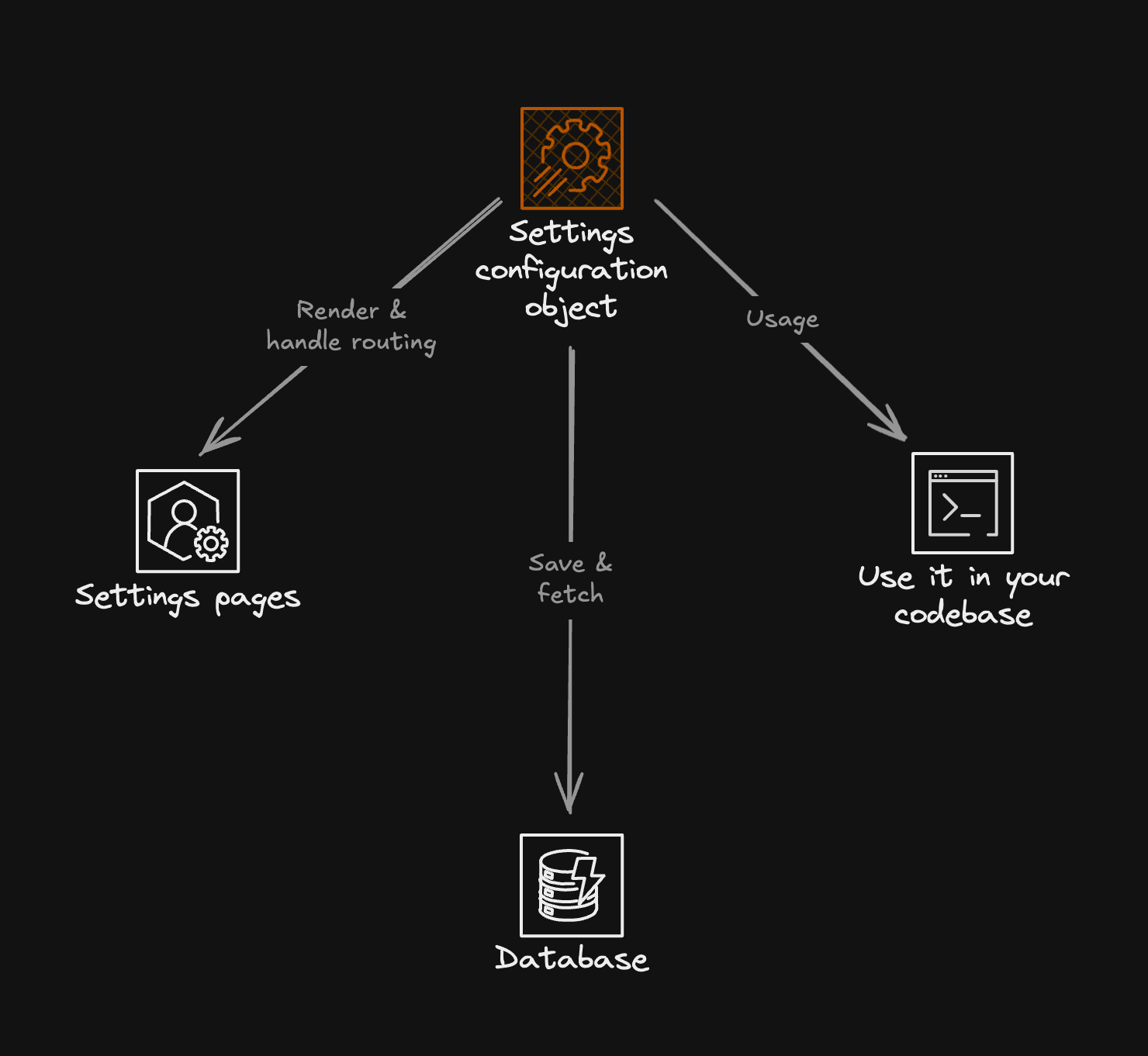
Settings architecture schema
That way, you just have to define your settings in a type-safe object and you are good to go. The settings UI, storage management and settings fetching is handled by the package.
The settings configuration is made of 3 objects from :
- a UI config object that control the ui (found in
settings.ui.config.tsfile) - a schema config object that define zod schemas used for type checking (found in
settings.schema.config.tsfile) - a server config object that contains the database controllers (found in
kit/shared/src/config/settings.server.config.tsfile)
How To Use
Define schema.
import { parseSchemaSettingConfig } from '@kit/settings/schema-config';
import { z } from 'zod';
export const settingsSchemas = parseSchemaSettingConfig({
schema: {
user_name: { schema: z.string().default(''), storage: 'user_attributes' },
theme: { schema: z.enum(['light', 'dark', 'system']), storage: 'user_settings' },
},
});Enqueue schema server-side.
import { enqueueServerFilter } from '@kit/utils/filters/server';
enqueueServerFilter('server_get_settings_schema', {
name: 'appSettingsSchema',
priority: 1,
fn: (input) => ({ schema: { ...input.schema, ...settingsSchemas.schema } }),
});Read settings server-side.
import { getServerSettings } from '@kit/settings/shared/server/get-server-settings';
type AppSettingsSchema = typeof settingsSchemas.schema;
const settings = await getServerSettings<AppSettingsSchema, ['theme', 'user_name']>({
settingKeys: ['theme', 'user_name'],
});Read settings client-side.
import { getClientSettings, useClientSettings } from '@kit/settings/shared';
type AppSettingsSchema = typeof settingsSchemas.schema;
const initial = await getClientSettings<AppSettingsSchema, 'theme'>({
clientTrpc,
settingKeys: ['theme'],
});
const query = useClientSettings<AppSettingsSchema, 'theme'>({
clientTrpc,
settingKeys: ['theme'],
});MCP Context
capability: settings_architecture entrypoints: - kit/settings/src/shared/server/get-server-settings.ts - kit/settings/src/shared/client/get-client-settings.ts - kit/settings/src/shared/client/use-client-settings.ts - app/lib/init-server-filters.ts inputs: - setting_keys - schema_filter_registration outputs: - typed_settings_values constraints: - schema keys must be registered via server filter before reads - reads with empty key arrays return empty object side_effects: - none for reads
Agent Recipe
- Check that requested keys exist in the effective schema filter output.
- Use
getServerSettingsfor server reads andgetClientSettings/useClientSettingsfor client reads. - Keep writes inside settings forms/router actions to preserve validation + storage routing.
Troubleshooting
Missing settings schema for keys ...means the app did not enqueue its schema ininit-server-filters.any-typed values usually indicate missing generic typing or missing module registry augmentation.
Related
Build typed settings pages and typed settings reads with @kit/settings.
Define, display, and persist keyboard shortcuts with @kit/keybindings.
How is this guide?
Last updated on 3/23/2026