Number Input
An enhanced number input with keyboard, mouse wheel, and drag controls.
Installation
Make sure that the following shadcn/ui components are present in your project:
Copy and paste the following code into your project.
'use client';

import { useCallback, useEffect, useRef, useState } from 'react';

const getStepValue = (e: MouseEvent | React.WheelEvent | React.KeyboardEvent, lockToStep: boolean): number => {
    let step = 1;
    if (e.ctrlKey) {
        step = 100;
    } else if (e.shiftKey) {
        step = 10;
    } else if (e.altKey && !lockToStep) {
        step = 0.1;
    }
    return step;
};

/**
 * Get the inner y position of the window.
 * @param y
 * @returns The inner y position of the window.
 */
const getWindowInnerYPosition = (y: number): number => {
    let finalY = y % window.innerHeight;
    if (finalY < 0) {
        finalY += window.innerHeight;
    }
    return finalY;
};

/**
 * Get the inner x position of the window.
 * @param x
 * @returns The inner x position of the window.
 */
const getWindowInnerXPosition = (x: number): number => {
    let finalX = x % window.innerWidth;
    if (finalX < 0) {
        finalX += window.innerWidth;
    }
    return finalX;
};

export interface UseInputDragControlParams {
    /**
     * The container able to trigger the drag control.
     */
    containerRef: React.RefObject<HTMLElement | null>;
    /**
     * The value of the number input.
     */
    value: number;
    /**
     * The step of the number input.
     * @default 1
     */
    step?: number;
    /**
     * The minimum value of the number input.
     */
    min?: number;
    /**
     * The maximum value of the number input.
     */
    max?: number;
    /**
     * The function to call when the value changes.
     */
    onDrag?: (newVal: number) => void;
    /**
     * Scale factor for drag sensitivity. Higher values make dragging more sensitive.
     * @default 1
     */
    dragScale?: number;
    /**
     * When true, disables ALT key 0.1 multiplier and snaps value to multiples of step.
     * @default false
     */
    lockToStep?: boolean;
    /**
     * Drag direction. Vertical: top is positive. Horizontal: right is positive.
     * @default 'vertical'
     */
    dragDirection?: 'vertical' | 'horizontal';
}

export const useInputDragControl = ({
    containerRef,
    value,
    step = 1,
    min,
    max,
    onDrag,
    dragScale = 1,
    lockToStep = false,
    dragDirection = 'vertical',
}: UseInputDragControlParams) => {
    const [isDragging, setIsDragging] = useState(false);
    const [xLocation, setXLocation] = useState(0);
    const [yLocation, setYLocation] = useState(0);
    const valueRef = useRef(value);
    const accumRef = useRef(0); // accumulate raw pointer movement along chosen axis

    // Keep an up-to-date reference to the external value so new drags
    // always start from the latest value
    useEffect(() => {
        valueRef.current = value;
    }, [value]);

    const handleMouseDown = useCallback(
        (e: React.MouseEvent) => {
            // Don't prevent default - let the input focus normally
            const currentValue = valueRef.current;
            const startX = e.clientX;
            const startY = e.clientY;
            setXLocation(startX);
            setYLocation(startY);

            const initialValue = currentValue;
            let delta = 0;
            let hasMoved = false;
            const moveThreshold = 3; // pixels threshold to start dragging

            const handleMouseMove = (e: MouseEvent) => {
                const deltaX = Math.abs(e.clientX - startX);
                const deltaY = Math.abs(e.clientY - startY);

                // Only start dragging if we've moved beyond the threshold
                if (!hasMoved && (deltaX > moveThreshold || deltaY > moveThreshold)) {
                    hasMoved = true;
                    setIsDragging(true);

                    // Request pointer lock for smooth dragging
                    if (containerRef.current) {
                        containerRef.current.requestPointerLock();
                    }
                    accumRef.current = 0;
                }

                if (hasMoved) {
                    const pxPerStep = Math.max(1, dragScale);
                    const finalStepUnit = step * getStepValue(e, lockToStep);
                    // Compute delta based on axis: vertical (top is positive), horizontal (right is positive)
                    const movementY = e.movementY;
                    const movementX = e.movementX;
                    const axisMovement = dragDirection === 'vertical' ? -movementY : movementX;
                    // accumulate axis movement and only apply value change when we reached a multiple of pxPerStep
                    accumRef.current += axisMovement;
                    const stepsCount = (accumRef.current / pxPerStep) | 0; // truncate toward zero
                    if (stepsCount !== 0) {
                        accumRef.current -= stepsCount * pxPerStep;
                        delta += stepsCount * finalStepUnit;
                    }
                    const newVal = initialValue + delta;

                    // Handle min/max clamping
                    let finalValue = newVal;
                    if (max !== undefined && newVal > max) {
                        finalValue = max;
                        delta = max - initialValue;
                    } else if (min !== undefined && newVal < min) {
                        finalValue = min;
                        delta = min - initialValue;
                    }

                    // Update cursor position using movement deltas
                    setXLocation((prevX) => {
                        const newX = prevX + e.movementX;
                        return getWindowInnerXPosition(newX);
                    });

                    setYLocation((prevY) => {
                        const newY = prevY + e.movementY;
                        return getWindowInnerYPosition(newY);
                    });

                    onDrag?.(finalValue);
                }
            };

            const handleMouseUp = () => {
                if (hasMoved) {
                    document.exitPointerLock();
                    setIsDragging(false);
                }
                document.removeEventListener('mousemove', handleMouseMove);
                document.removeEventListener('mouseup', handleMouseUp);
            };

            document.addEventListener('mousemove', handleMouseMove);
            document.addEventListener('mouseup', handleMouseUp);
        },
        [step, min, max, onDrag, containerRef, dragScale, lockToStep],
    );

    // Handle custom cursor
    useEffect(() => {
        const cursor = document.getElementById('locked-cursor');
        if (isDragging) {
            if (cursor) {
                if (document.pointerLockElement) {
                    cursor.style.top = `${yLocation}px`;
                    cursor.style.left = `${xLocation}px`;
                    cursor.style.transform = `${dragDirection === 'horizontal' ? 'rotate(90deg)' : 'rotate(0deg)'}`;
                }
            } else {
                // Create custom drag cursor
                const createdCursor = document.createElement('div');
                createdCursor.innerHTML = `
                    <svg stroke="currentColor" fill="currentColor" stroke-width="0" viewBox="0 0 24 24" height="24" width="24" xmlns="http://www.w3.org/2000/svg">
                        <path stroke="white" stroke-linecap="round" stroke-width="1" d="M13 6.99h3L12 3 8 6.99h3v10.02H8L12 21l4-3.99h-3z"></path>
                    </svg>
                `;
                createdCursor.classList.add('drag-icon');
                createdCursor.id = 'locked-cursor';
                createdCursor.style.cssText = `
                    position: fixed;
                    pointer-events: none;
                    z-index: 9999;
                    color: #6b7280;
                    transform: ${dragDirection === 'horizontal' ? 'rotate(90deg)' : 'rotate(0deg)'};
                `;
                document.body.append(createdCursor);
                createdCursor.style.top = `${yLocation}px`;
                createdCursor.style.left = `${xLocation}px`;
            }
        } else if (cursor) {
            cursor.remove();
        }
    }, [xLocation, yLocation, isDragging, dragDirection]);

    return { handleMouseDown, isDragging };
};
'use client';

import { Input } from '@kit/ui/input';
import { cn } from '@kit/utils';
import { Slot } from '@radix-ui/react-slot';
import React, { createContext, forwardRef, useCallback, useContext, useEffect, useRef, useState } from 'react';
import { useInputDragControl } from '../hooks/use-input-drag-control';

interface NumberInputContextValue {
    value: number | '';
    min?: number;
    max?: number;
    step: number;
    unit?: string;
    onValueChange: (value: number | '') => void;
}

const NumberInputContext = createContext<NumberInputContextValue | null>(null);

const useNumberInputContext = () => {
    const context = useContext(NumberInputContext);
    if (!context) {
        throw new Error('NumberInput components must be used within NumberInputRoot');
    }
    return context;
};

export interface NumberInputRootProps {
    /**
     * Whether to render the number input as a child component.
     * @default false
     */
    asChild?: boolean;
    value?: number | '';
    defaultValue?: number;
    /**
     * The unit of the number input.
     */
    unit?: string;
    /**
     * The minimum value of the number input.
     */
    min?: number;
    /**
     * The maximum value of the number input.
     */
    max?: number;
    /**
     * The step of the number input.
     * @default 1
     */
    step?: number;
    onValueChange?: (value: number | '') => void;
    className?: string;
}

const NumberInputRoot = forwardRef<HTMLDivElement, NumberInputRootProps & React.PropsWithChildren>(
    (
        {
            asChild = false,
            children,
            value: propValue,
            defaultValue = 0,
            min,
            max,
            step = 1,
            unit,
            onValueChange,
            className,
            ...props
        },
        ref,
    ) => {
        const Comp = asChild ? Slot : 'div';
        const prevPropValueRef = useRef(propValue);

        const [internalValue, setInternalValue] = useState<number | ''>(propValue ?? defaultValue);

        // Use controlled state if open prop is provided, otherwise use internal state
        const finalValue = propValue !== undefined ? propValue : internalValue;

        const handleValueChange = useCallback(
            (value: number | '' | ((prev: number | '') => number | '')) => {
                const newValue = typeof value === 'function' ? value(finalValue) : value;

                if (propValue === undefined) {
                    // Only update internal state if not controlled
                    setInternalValue(newValue);
                }

                // Always call onOpenChange if provided
                onValueChange?.(newValue);
            },
            [finalValue, propValue, onValueChange],
        );

        // Sync with controlled prop value
        useEffect(() => {
            if (typeof propValue === 'number' && propValue !== prevPropValueRef.current) {
                setInternalValue(propValue);
                prevPropValueRef.current = propValue;
            }
        }, [propValue]);

        const contextValue: NumberInputContextValue = {
            value: internalValue,
            min,
            max,
            step,
            unit,
            onValueChange: handleValueChange,
        };

        return (
            <NumberInputContext.Provider value={contextValue}>
                <Comp ref={ref} className={cn('flex items-center gap-2', className)} {...props}>
                    {children}
                </Comp>
            </NumberInputContext.Provider>
        );
    },
);
NumberInputRoot.displayName = 'NumberInputRoot';

export interface DragWheelControlsProps {
    /**
     * Whether to render the drag and wheel controls as a child component.
     * @default false
     */
    asChild?: boolean;
    /**
     * Whether to enable drag functionality.
     * @default false
     */
    disableDrag?: boolean;
    /**
     * Whether to enable wheel functionality.
     * @default false
     */
    disableWheel?: boolean;
    /**
     * Scale factor for drag sensitivity. Higher values make dragging more sensitive.
     * @default 1
     */
    dragScale?: number;
    /**
     * Scale factor for wheel sensitivity. Higher values make wheel scrolling more sensitive.
     * @default 1
     */
    wheelScale?: number;
    /**
     * When true, disables ALT key 0.1 multiplier and snaps value to multiples of step.
     * @default false
     */
    lockToStep?: boolean;
    /**
     * Drag axis. Vertical: top is positive. Horizontal: right is positive.
     * @default 'vertical'
     */
    dragDirection?: 'vertical' | 'horizontal';
}

const DragWheelControls = forwardRef<HTMLDivElement, DragWheelControlsProps & React.HTMLAttributes<HTMLDivElement>>(
    (
        {
            children,
            asChild = false,
            disableDrag = false,
            disableWheel = false,
            dragScale = 1,
            wheelScale = 1,
            lockToStep = false,
            dragDirection = 'vertical',
            className,
            ...props
        },
        ref,
    ) => {
        const Comp = asChild ? Slot : 'div';
        const { value, onValueChange, min, max, step } = useNumberInputContext();
        const localRef = useRef<HTMLDivElement>(null);

        const currentValue = typeof value === 'number' ? value : (min ?? 0);

        // Handle wheel increment
        useEffect(() => {
            const container = localRef.current;
            if (!container || disableWheel) return;

            const handleWheel = (event: WheelEvent) => {
                event.preventDefault();
                event.stopPropagation();

                const direction = event.deltaY < 0 ? 1 : -1;
                const threshold = Math.max(1, Math.round(wheelScale));

                const anyContainer = container as unknown as { __wheelAccum?: number };
                anyContainer.__wheelAccum = (anyContainer.__wheelAccum ?? 0) + direction;
                const stepsCount = (anyContainer.__wheelAccum / threshold) | 0;
                if (stepsCount === 0) return;
                anyContainer.__wheelAccum -= stepsCount * threshold;

                const increment = stepsCount * step;
                const newValue = Math.round((currentValue + increment) / step) * step;
                const clampedValue = Math.min(max ?? Infinity, Math.max(min ?? -Infinity, newValue));
                onValueChange(clampedValue);
            };

            container.addEventListener('wheel', handleWheel, { passive: false });
            return () => container.removeEventListener('wheel', handleWheel);
        }, [disableWheel, currentValue, step, wheelScale, min, max, onValueChange]);

        const { handleMouseDown, isDragging } = useInputDragControl({
            containerRef: localRef,
            value: currentValue,
            step,
            min,
            max,
            onDrag: onValueChange,
            dragScale,
            lockToStep,
            dragDirection,
        });

        return (
            <Comp
                ref={(node) => {
                    localRef.current = node;
                    if (typeof ref === 'function') {
                        ref(node);
                    } else if (ref) {
                        (ref as React.RefObject<HTMLDivElement | null>).current = node;
                    }
                }}
                onMouseDown={!disableDrag ? handleMouseDown : undefined}
                style={{
                    cursor: isDragging ? (dragDirection === 'horizontal' ? 'ew-resize' : 'ns-resize') : 'default',
                }}
                className={cn('flex items-center gap-2', className)}
                {...props}
            >
                {children}
            </Comp>
        );
    },
);
DragWheelControls.displayName = 'DragWheelControls';

const NumberInputBase = forwardRef<
    HTMLInputElement,
    Omit<React.InputHTMLAttributes<HTMLInputElement>, 'value' | 'onChange' | 'min' | 'max' | 'step'>
>(({ className, ...props }, ref) => {
    const { value, onValueChange, min, max, step, unit } = useNumberInputContext();

    const inputRef = useRef<HTMLInputElement>(null);

    const handleChange = useCallback(
        (event: React.ChangeEvent<HTMLInputElement>) => {
            const newValue = event.target.value === '' ? '' : Number(event.target.value);
            onValueChange(newValue);
        },
        [onValueChange],
    );

    const handleBlur = useCallback(() => {
        if (typeof value === 'number') {
            const clampedValue = Math.min(max ?? Infinity, Math.max(min ?? -Infinity, value));
            onValueChange(clampedValue);
        } else {
            onValueChange(min ?? 0);
        }
    }, [value, min, max, onValueChange]);

    const handleKeyDown = useCallback(
        (event: React.KeyboardEvent<HTMLInputElement>) => {
            if (event.key === 'ArrowUp' || event.key === 'ArrowDown') {
                event.preventDefault();
                const direction = event.key === 'ArrowUp' ? 'up' : 'down';
                const increment = direction === 'up' ? step : -step;
                const currentValue = typeof value === 'number' ? value : (min ?? 0);
                const newValue = Math.round((currentValue + increment) / step) * step;
                const clampedValue = Math.min(max ?? Infinity, Math.max(min ?? -Infinity, newValue));
                onValueChange(clampedValue);
            }
        },
        [value, step, min, max, onValueChange],
    );

    return (
        <Input
            ref={ref || inputRef}
            type="number"
            value={value}
            onChange={handleChange}
            onBlur={handleBlur}
            onKeyDown={handleKeyDown}
            min={min}
            max={max}
            step={step}
            aria-valuemin={min}
            aria-valuemax={max}
            aria-valuenow={typeof value === 'number' ? value : undefined}
            aria-valuetext={typeof value === 'number' ? `${value}${unit ? ` ${unit}` : ''}` : undefined}
            className={cn('flex-1', className)}
            {...props}
        />
    );
});
NumberInputBase.displayName = 'NumberInputBase';

export interface NumberInputUnitProps {
    /**
     * Whether to render the number input unit as a child component.
     * @default false
     */
    asChild?: boolean;
}

const NumberInputUnit = forwardRef<HTMLDivElement, NumberInputUnitProps & React.HTMLAttributes<HTMLDivElement>>(
    ({ className, children, asChild = false, ...props }, ref) => {
        const Comp = asChild ? Slot : 'div';
        const { unit } = useNumberInputContext();

        const displayUnit = children || unit;

        if (!displayUnit) return null;

        return (
            <Comp ref={ref} className={cn('text-muted-foreground text-sm whitespace-nowrap', className)} {...props}>
                {displayUnit}
            </Comp>
        );
    },
);
NumberInputUnit.displayName = 'NumberInputUnit';

/* _______Higher Level Component________ */

export interface NumberInputProps extends Omit<NumberInputRootProps, 'children' | 'asChild'> {
    controls?: DragWheelControlsProps;
    base?: React.ComponentProps<typeof NumberInputBase>;
}

const NumberInput: React.FC<NumberInputProps> = ({ controls = {}, base = {}, ...props }) => {
    return (
        <NumberInputRoot {...props} asChild>
            <DragWheelControls {...controls}>
                <NumberInputBase {...base} />
                <NumberInputUnit />
            </DragWheelControls>
        </NumberInputRoot>
    );
};

export { DragWheelControls, NumberInput, NumberInputBase, NumberInputRoot, NumberInputUnit };
Update the import paths to match your project setup.
Usage
import { DragWheelControls, NumberInputBase, NumberInputRoot, NumberInputUnit } from '@kit/ui/number-input';<NumberInputRoot unit="px">
<DragWheelControls>
<NumberInputBase placeholder="Your placeholder here" className="w-24 text-right" />
<NumberInputUnit />
</DragWheelControls>
</NumberInputRoot>Or you can use the NumberInput if you don't need that much customization.
import { NumberInput } from '@kit/ui/number-input';<NumberInput unit="px" />Features
- Keyboard arrow key controls (↑↓)
- Mouse wheel scrolling support
- Click and drag vertical adjustment
- Unit display support
- Min/max value constraints
- Decimal step increments
- Accessible ARIA attributes
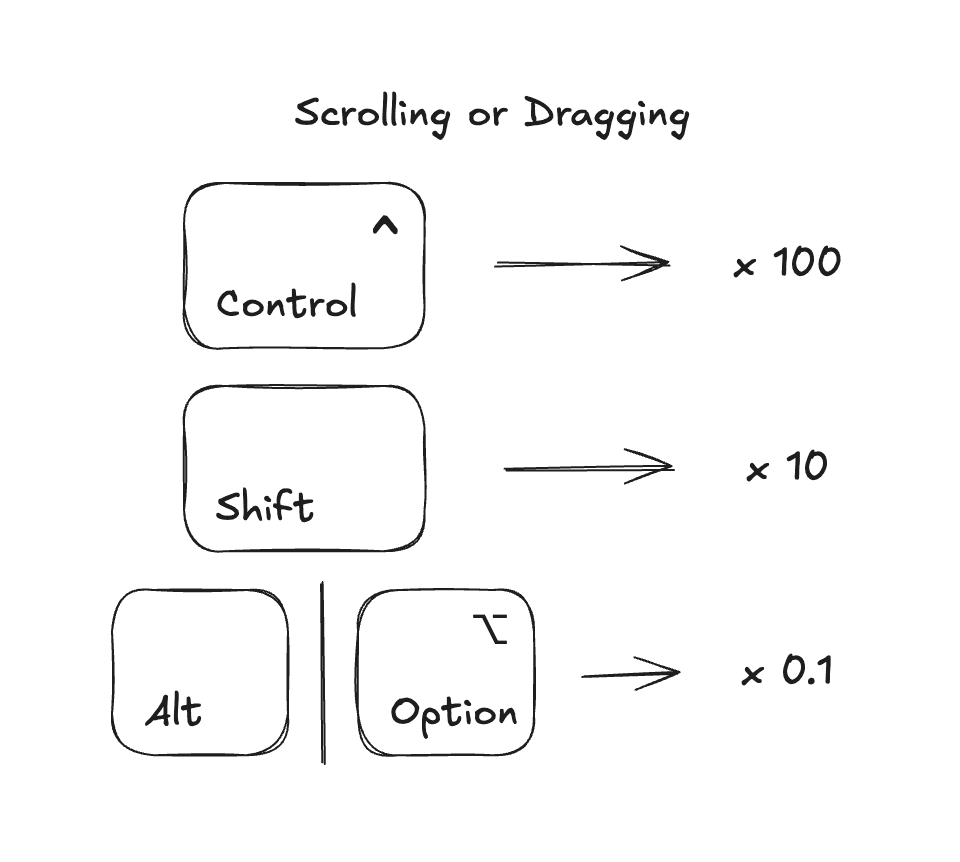
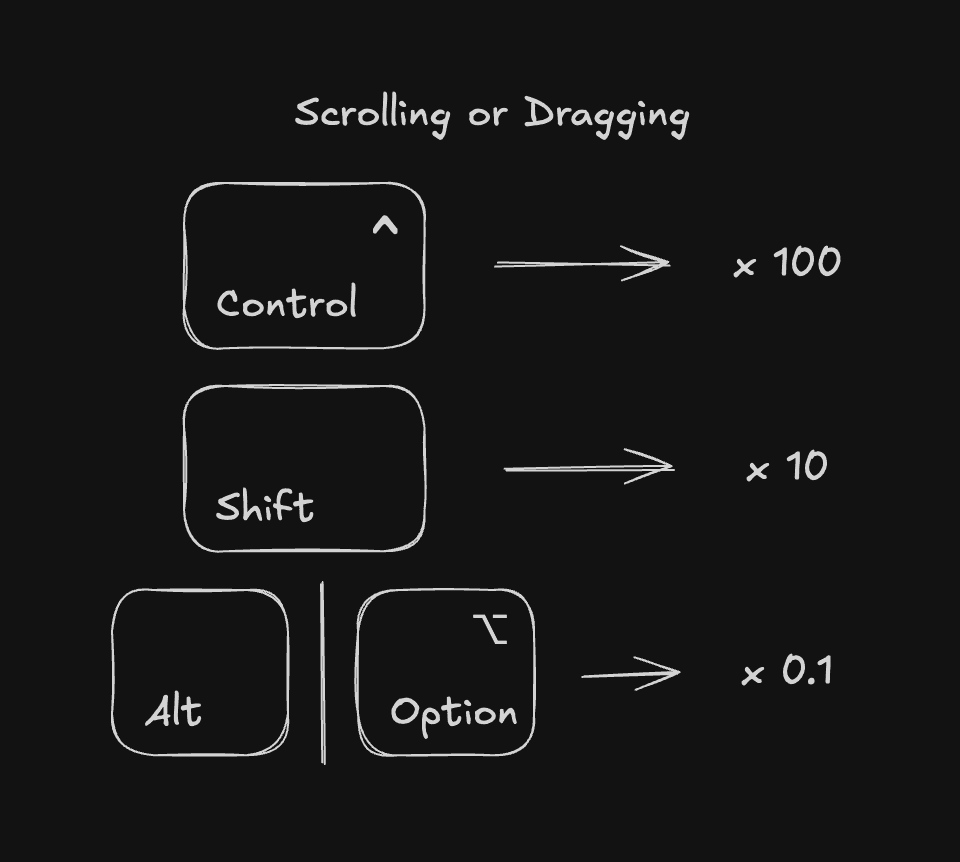
Control step factor with the keyboard
You can control the step factor with the keyboard by holding the ALT, SHIFT, or CTRL key.
Number Input component anatomy
Examples
Horizontal Drag
Switch the drag direction to horizontal.
Custom Scale
Control the sensitivity of the drag and wheel controls.
Min/Max
Base
The NumberInputBase component is a simpler version of the NumberInput component without drag and wheel controls.
API Reference
We are exposing 2 components
Root
NumberInputRootProps
| Prop | Type | Default |
|---|---|---|
asChild | boolean | false |
value | number | "" | |
defaultValue | number | |
unit | string | |
min | number | |
max | number | |
step | number | 1 |
onValueChange | function | |
className | string |
Drag & Wheel Controls
DragWheelControlsProps
| Prop | Type | Default |
|---|---|---|
asChild | boolean | false |
disableDrag | boolean | false |
disableWheel | boolean | false |
dragScale | number | 1 |
wheelScale | number | 1 |
lockToStep | boolean | false |
dragDirection | "vertical" | "horizontal" | 'vertical' |
Base
The input type="number" element.
Unit
NumberInputUnitProps
| Prop | Type | Default |
|---|---|---|
asChild | boolean | false |
All in one
This component is a shortcut if you don't need heavy customization.
NumberInputProps
| Prop | Type | Default |
|---|---|---|
controls | DragWheelControlsProps | |
base | (Omit<React.InputHTMLAttributes<HTMLInputElement>... | |
value | number | "" | |
defaultValue | number | |
unit | string | |
min | number | |
max | number | |
step | number | 1 |
onValueChange | function | |
className | string |
A high level component to handle the AlertDialog component when you need to confirm an action.
A phone input component that simplifies the phone input.
How is this guide?
Last updated on 1/29/2026